Analytics
Analytics gives you the view no single store console can: weekly active users, installs, and version adoption combined across Chrome, Firefox, Edge, and Safari in one dashboard, instead of checking four consoles by hand. It’s the same idea as Publishing’s one-dashboard-for-review-status, applied to usage.
The model in one sentence: your extension sends one anonymous ping per install per day — a random id, its version, and the browser’s UI language — and extport derives everything else (browser, OS, country) from the request itself, server-side.
1. Turn it on
Section titled “1. Turn it on”If your extension uses @extport/wxt, it’s one flag:
export default defineConfig({ modules: ['@extport/wxt'], extport: { extension: 'ext_…', analytics: true, },})This injects the daily ping into your background script and adds Firefox’s data-collection declaration to the manifest automatically — nothing to write in your own source.
Without the WXT module, call the SDK directly from your background entrypoint:
import { attachAnalytics } from '@extport/sdk/analytics'
attachAnalytics({ extensionId: 'ext_…' })
Either way, the ping is on by default (mirroring how Firefox’s own install-prompt toggle works — on, with an easy way to turn it off) and never throws: a network hiccup or a missing id just means no ping that day, never a broken extension.
2. Declare it to the stores
Section titled “2. Declare it to the stores”Checking the box on your side isn’t the whole story — each store store asks developers what data they collect, and now there’s a real (if minimal) answer. The exact fields the ping sends, and why each box is or isn’t checked:
Chrome Web Store — under your listing’s Privacy practices tab:
- Check Location — the ping’s country comes from the request itself (Chrome’s own example text names “region, IP address”).
- Leave everything else unchecked — the ping carries no personal identifiers, no behavioral data, and no browsing history.
- Checking any box makes the listing’s privacy policy URL field required — link to your own policy describing this (a short template: random install id, version, language, IP used only for the country lookup and never stored, 90-day raw retention).
Firefox — nothing to fill in by hand. The technicalAndInteraction data-collection declaration is added to
your manifest automatically (by @extport/wxt, or your own browser_specific_settings.gecko.data_collection_permissions
if you’re wiring the SDK directly) — Firefox shows it in the install prompt and lets users manage it later under
about:addons. Your listing still needs a privacy policy link.
App Store Connect (Safari-shipping extensions) — under App Privacy:
- Data type: Identifiers → Device ID.
- Purpose: Analytics.
- Linked to the user’s identity: No.
- Used for tracking: No — this isn’t the third-party data linkage Apple’s “tracking” definition covers.
Edge Add-ons — no separate data-disclosure form as of writing; the same privacy policy link covers it.
3. Read the dashboard
Section titled “3. Read the dashboard”Open your extension’s Analytics tab. Every chart reads straight from the daily rollup:
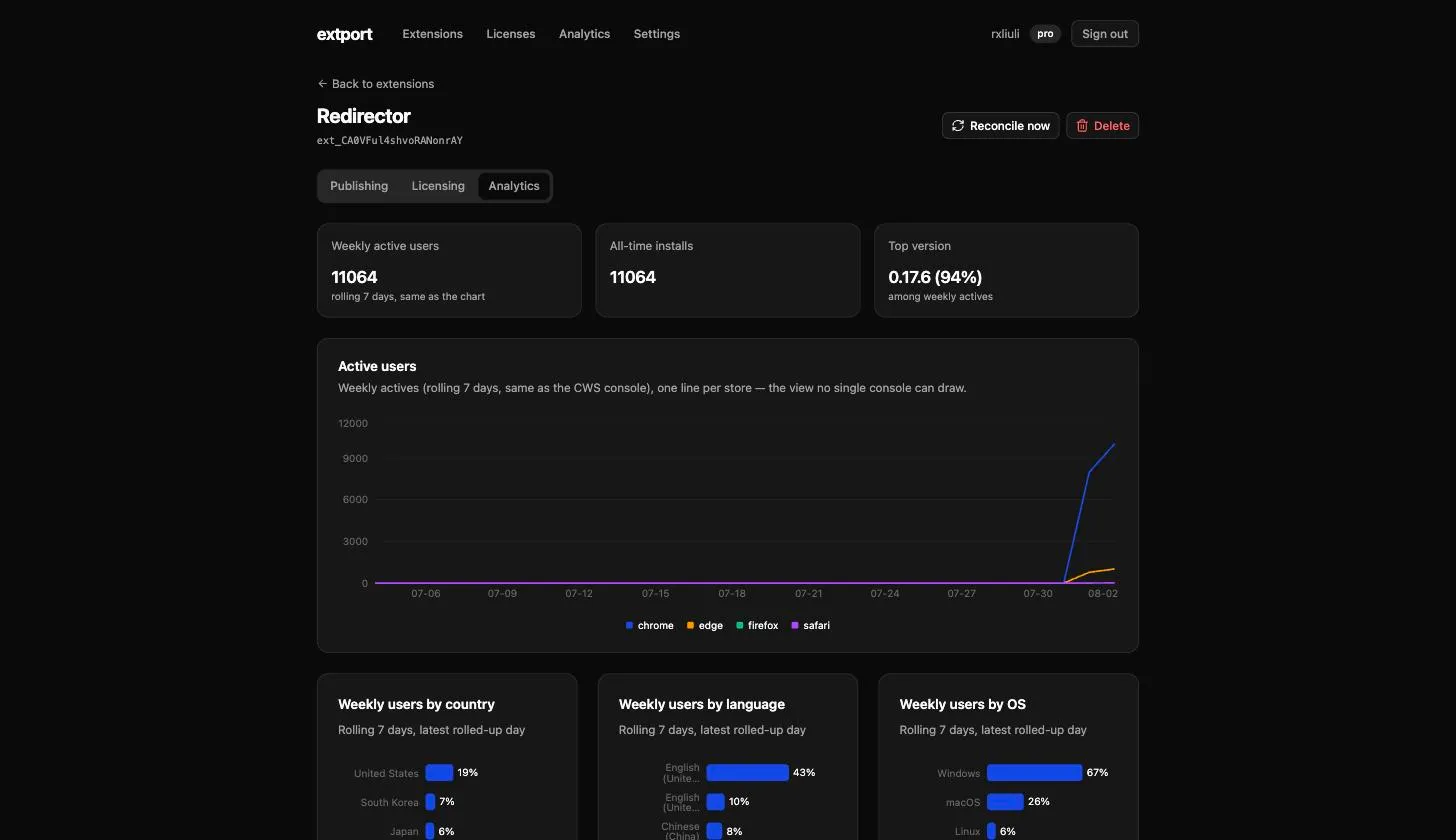
- Active users — weekly actives (rolling 7 days, the same metric the Chrome Web Store console headlines), one line per store, so a review going sideways on one store or a release adopting slowly shows up as that store’s line diverging from the others. A weekly window also absorbs the natural day-to-day jitter of extension usage — a browser that stays closed for a day isn’t a lost user.
- Weekly users by country / language / OS — top 5 + Other for each, over the same rolling week.
- Installs & departures — same-day-exact installs; departures are covered below.
- Version saturation — daily actives stacked by version, so a release’s adoption curve visibly eats the layer below it. This is the number to watch before assuming an old version’s users are gone.
How the rest behaves
Section titled “How the rest behaves”- The chart window is fixed and always ends yesterday — the last day fully rolled up, same convention the store consoles themselves use. Days without data still draw as zero, so a new install shows up as a line rising out of a flat month, not a floating point.
- Departures are confirmed, not guessed. An install is counted as departed only after 30 days of silence, and the count is attributed back to the day it was last seen — not the day the 30-day window closed. That means the most recent month never shows departures yet; give it time rather than reading a flat trailing edge as “nobody’s leaving.”
- Firefox’s own toggle is respected automatically. If someone declines
technicalAndInteractionat install (or turns it off later inabout:addons), the SDK checks that permission fresh on every ping — no code of yours needs to react to it. - Nothing here is behavioral. No URL, no page content, no feature usage — the wire protocol is exactly one event (the daily ping), so there’s nothing to add and nothing to accidentally over-collect.