Publishing
Once you’ve signed in and created an extension, connect it to the stores you publish to and push a build.
The examples on this page and the store pages all use one real, published extension — Redirector, which ships on all four stores — so every id shown is something you can look up yourself, not a placeholder.
1. Add your store credentials
Section titled “1. Add your store credentials”Under Settings → Store credentials, add a credential for each store you publish to. Each row shows the store, a label, the last four characters of the credential, and whether it verified successfully:
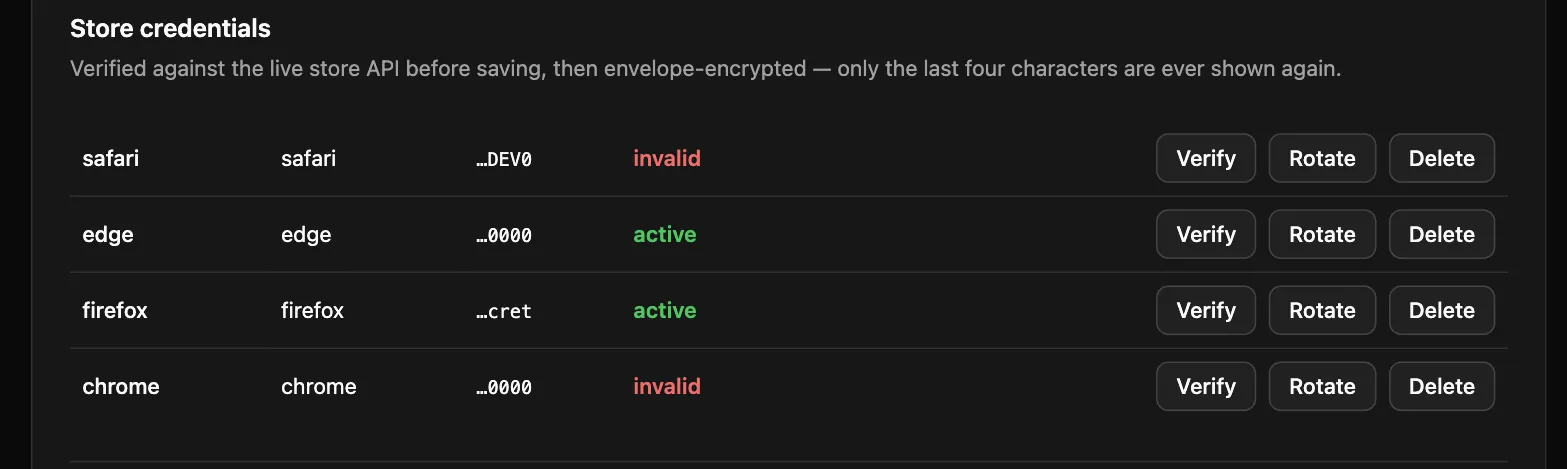
See the per-store pages for exactly which fields you need and where to find them:
2. Connect a store target
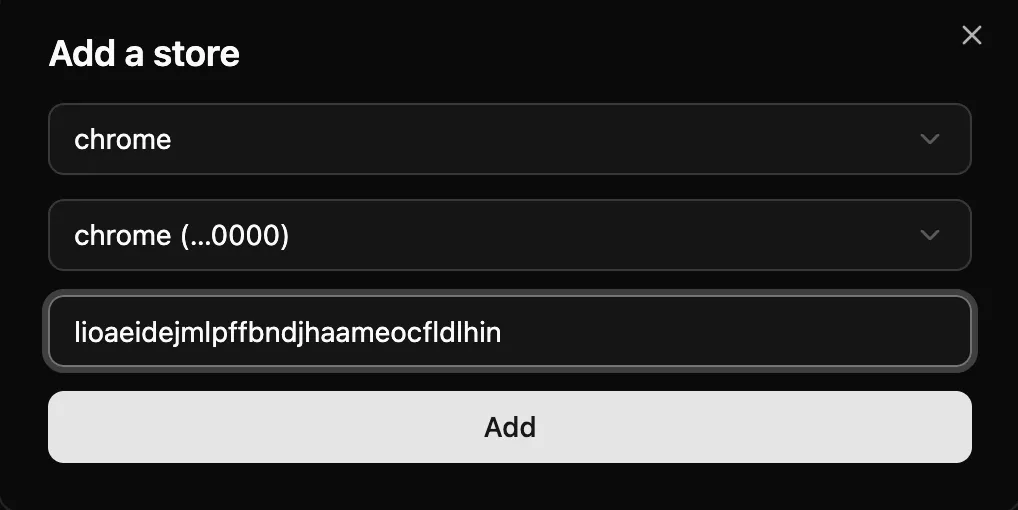
Section titled “2. Connect a store target”Open your extension and click Add a store. This is where the store’s own listing id and one of your credentials
get linked together — for Redirector on Chrome, that’s its real item id, lioaeidejmlpffbndjhaameocfldlhin
(from its Chrome Web Store listing):
3. Get an API key
Section titled “3. Get an API key”Under Settings → API keys, name a key and click Create. The full value is shown exactly once — copy it immediately, since only the last four characters are shown afterward:
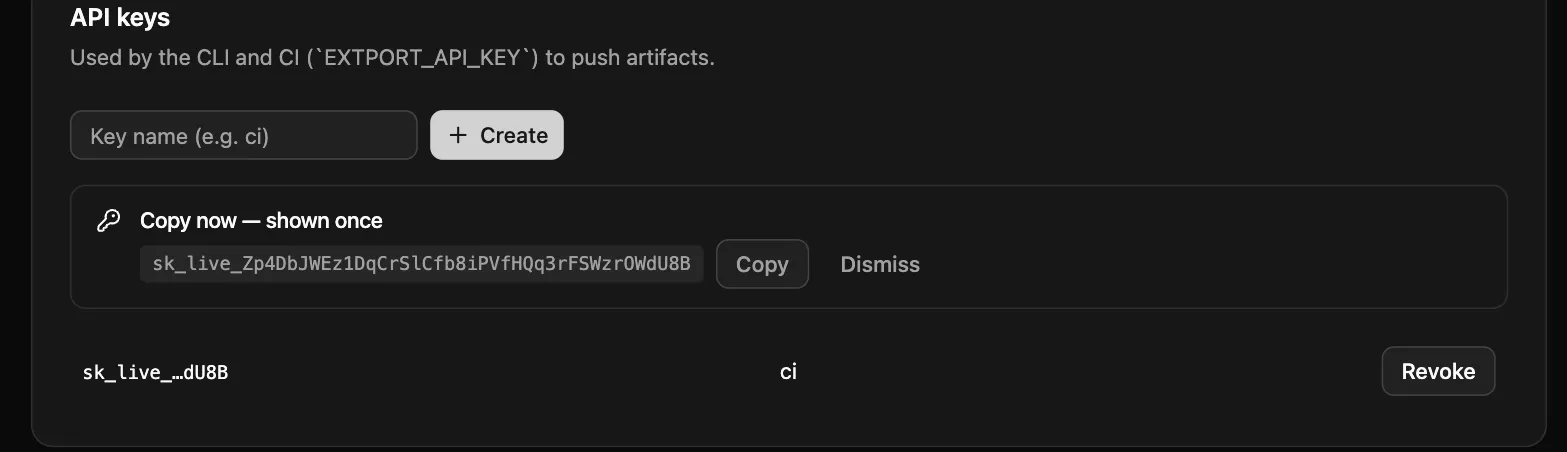
This is what the CLI and GitHub Actions use to push on your behalf — treat it like a password.
4. Push a build
Section titled “4. Push a build”Either from your own machine:
npx extport login # once per machine — stores a key locally, so push never needs --api-key herenpx extport push # WXT project: zip, version, and extension id all inferredIn a WXT project with @extport/wxt configured, that’s the whole
command: the extension id comes from extport.config.json, the per-browser zips from
.output/{name}-{version}-{browser}.zip, and the version from their manifest.json. Outside a WXT project,
point at the zip explicitly — the version still reads from the zip’s own manifest.json, and --extension is
only needed if you haven’t created an extport.config.json:
npx extport push path/to/my-extension.zip --store chromeWhen passing a file, always say which store it was built for — zips are per-browser artifacts.
Or from CI, using the published GitHub Actions — CI can’t run the interactive login, so the API key input
takes its place, and everything else infers exactly like the local command. The convention is one step per
store (it’s what extport init scaffolds), because per-store inputs like Firefox’s source zip attach to their
own step and each store fails independently in the run view:
- uses: extport-dev/actions/push@v1  with:    # file/version/extension inferred from .output/, its manifest.json, and extport.config.json    store: chrome    api-key: ${{ secrets.EXTPORT_API_KEY }}
- uses: extport-dev/actions/push@v1  with:    # AMO's source zip infers too — .output/{name}-{version}-sources.zip, WXT's own sourcesTemplate    store: firefox    api-key: ${{ secrets.EXTPORT_API_KEY }}
Edge and Safari follow the same pattern (store: edge falls back to the chrome zip when no dedicated edge
build exists; store: safari registers the version only — no zip travels through extport, see the
Safari page). extport init scaffolds the complete workflow below
so you never write it by hand.
Every push is checked against its target stores before it’s accepted: a zip without a manifest.json, a manifest
version that doesn’t match the pushed version, a Chrome-only build (no gecko.id, service-worker-only background)
headed for Firefox, or Manifest V2 headed for Chrome all fail immediately with the reason — not days later in
store review.
The complete release workflow
Section titled “The complete release workflow”This is Redirector’s actual release.yaml — every release of it ships
to all four stores through this exact file, so it is a production-tested reference, not a synthetic sample.
Change the two env values and it is yours; extport init scaffolds the same file into new projects.
Read it noticing what is absent: no Chrome service account, no AMO JWT, no Edge API key. Store submission happens server-side with the credentials you added in step 1, which never enter CI. The only signing material in the workflow is Apple’s — a structural exception, because the App Store Connect API cannot upload binaries, so the Safari build must be signed and uploaded from a macOS runner you control.
env:  DIRECTORY: .          # your extension's directory ("." unless a monorepo)  PROJECT_NAME: redirector
name: Release
# A release is a version bump: push a package.json with a new version to# main and this fires. No tags to remember, no manual dispatch.on:  push:    branches: [main]    paths:      - 'package.json'
jobs:  version:    runs-on: ubuntu-latest    timeout-minutes: 15    outputs:      changed: ${{ steps.version.outputs.changed }}      version: ${{ steps.version.outputs.version }}    steps:      - uses: actions/checkout@v5        with:          fetch-depth: 2      - name: Check version change        id: version        uses: rxliuli/version-check@v1        with:          file: ${{ env.DIRECTORY }}/package.json
  # Chrome, Edge, and Firefox: build, attach the zips to a GitHub Release,  # push to extport. Submission for review is the reconcile loop's job from  # here — if a store has a bad day, extport retries on its own schedule and  # this run stays green.  release:    permissions:      contents: write    needs: version    if: needs.version.outputs.changed == 'true'    runs-on: ubuntu-latest    timeout-minutes: 15    steps:      - uses: actions/checkout@v5      - uses: pnpm/action-setup@v6      - uses: actions/setup-node@v6        with:          node-version: 24          cache: 'pnpm'      - name: Install dependencies        run: pnpm install      - name: Zip extensions        run: |          cd ${{ env.DIRECTORY }}          pnpm zip          pnpm zip:firefox
      - name: Create Release        uses: softprops/action-gh-release@v3        with:          tag_name: 'v${{ needs.version.outputs.version }}'          name: 'v${{ needs.version.outputs.version }}'          generate_release_notes: true          draft: false          prerelease: false          files: |            ${{ env.DIRECTORY }}/.output/${{ env.PROJECT_NAME }}-${{ needs.version.outputs.version }}-chrome.zip            ${{ env.DIRECTORY }}/.output/${{ env.PROJECT_NAME }}-${{ needs.version.outputs.version }}-firefox.zip            ${{ env.DIRECTORY }}/.output/${{ env.PROJECT_NAME }}-${{ needs.version.outputs.version }}-sources.zip
      - name: Push to Chrome Web Store        uses: extport-dev/actions/push@v1        with:          # file/version/extension inferred from .output/, its manifest.json, and extport.config.json.          store: chrome          api-key: ${{ secrets.EXTPORT_API_KEY }}
      - name: Push to Edge Add-ons        uses: extport-dev/actions/push@v1        with:          # Edge is Chromium-based — extport falls back to the chrome zip          # when no dedicated edge one was built.          store: edge          api-key: ${{ secrets.EXTPORT_API_KEY }}
      - name: Push to Firefox AMO        uses: extport-dev/actions/push@v1        with:          # file/version inferred; source-zip has no equivalent convention to infer from.          source-zip: .output/${{ env.PROJECT_NAME }}-${{ needs.version.outputs.version }}-sources.zip          store: firefox          api-key: ${{ secrets.EXTPORT_API_KEY }}
  # Safari: build, sign, and upload the binary from macOS with your own  # Apple credentials — the one store where CI must hold signing material  # (the ASC API cannot upload binaries). It never submits for review:  # extport's reconcile submits on its own once the build finishes  # processing in App Store Connect, so a red job here just means re-run  # this job — the queued version waits.  safari:    needs: version    if: needs.version.outputs.changed == 'true'    runs-on: macos-26    # macOS runners bill at 10x Linux rates — a hung job burns your whole    # month of free minutes, so every job here caps its runtime, this one    # most of all.    timeout-minutes: 15    # Apple-side flakiness must not mark the release failed — the other    # three stores already shipped independently.    continue-on-error: true    steps:      - uses: actions/checkout@v5      - uses: pnpm/action-setup@v6      - uses: actions/setup-node@v6        with:          node-version: 24          cache: 'pnpm'      - name: Install dependencies        run: pnpm install
      - name: Build Safari extension        run: pnpm build:safari
      - uses: extport-dev/actions/safari-build@v1        with:          # project-path/team-id inferred from extport.config.json (synced by          # @extport/wxt). Automatic code signing via -allowProvisioningUpdates,          # reusing the certificate below instead of minting a new one every          # run — an ephemeral runner has no local keychain, so without this          # it silently burns one Apple certificate per run until the account          # hits Apple's cap.          issuer-id: ${{ secrets.APPLE_API_ISSUER }}          key-id: ${{ secrets.APPLE_API_KEY_ID }}          key-base64: ${{ secrets.APPLE_API_KEY }}          certificate-base64: ${{ secrets.APPLE_CERTIFICATE_BASE64 }}          certificate-password: ${{ secrets.APPLE_CERTIFICATE_PASSWORD }}          version: ${{ needs.version.outputs.version }}
      - name: Register the Safari version with extport        uses: extport-dev/actions/push@v1        with:          # version/extension inferred — no zip travels through extport for safari.          store: safari          api-key: ${{ secrets.EXTPORT_API_KEY }}
Secrets
Section titled “Secrets”| Secret | Used by | Where it comes from |
|---|---|---|
EXTPORT_API_KEY |
every push step | step 3 above |
APPLE_API_ISSUER, APPLE_API_KEY_ID, APPLE_API_KEY |
safari-build |
App Store Connect API key — see Safari |
APPLE_CERTIFICATE_BASE64, APPLE_CERTIFICATE_PASSWORD |
safari-build |
your Apple Distribution certificate, exported as base64 .p12 — see Safari |
Tailoring
Section titled “Tailoring”- No Safari target? Delete the entire
safarijob and the fiveAPPLE_*secrets. Nothing else references them. - No Edge target? Delete its one push step.
- Monorepo? Set
DIRECTORYto the extension’s path and add it to the trigger’spaths.
Shell completion
Section titled “Shell completion”extport completion bash|zsh|fish prints a Tab-completion script for subcommands, flag names, and the values of
--store/--platform. It only prints — add the right line to your shell’s own config to make it stick, same as
gh/kubectl/rustup:
eval "$(extport completion zsh)"
# ~/.bashrceval "$(extport completion bash)"
# ~/.config/fish/config.fishextport completion fish | source
Open a new terminal (or source the file you just edited) to pick it up. The shell name is optional — omit it
(extport completion) and it detects the one you’re currently running.