Subscriptions
Subscriptions are built for extensions with user accounts and a backend (for example, cloud sync, hosted AI quotas,
or team features). Instead of integrating the Stripe SDK, webhooks, and Stripe Billing Portal yourself, your backend
calls extport’s /api/v1/subscriptions/* API while payments settle directly into your own Stripe account via Stripe
Connect.
There are no activation codes or key emails — Stripe recurring checkouts sync directly into extport’s subscriptions
table, your backend checks entitlements server-side, and subscribers manage cancellations, plan switches, and invoices
inside extport’s native Buyer Portal.
1. Connect your Stripe account
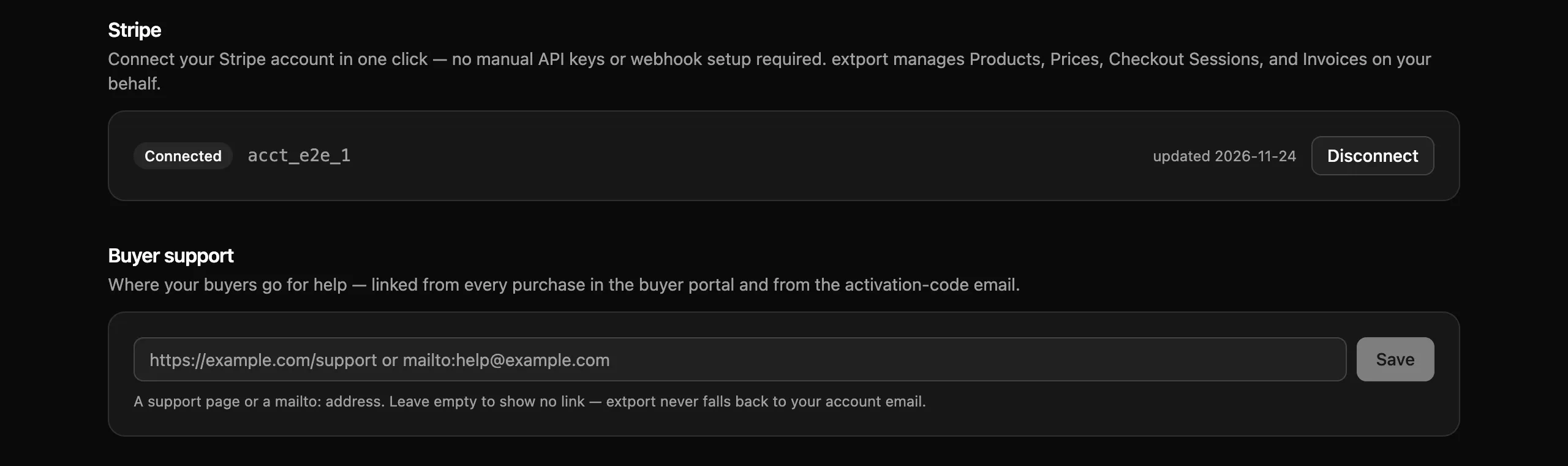
Section titled “1. Connect your Stripe account”Go to Settings → Stripe and click Connect with Stripe.
This uses Stripe Connect Standard OAuth2:
- You can connect a Stripe Sandbox / Test account first, then switch to Live mode when ready.
- All subscription webhooks (
checkout.session.completed,customer.subscription.created,customer.subscription.updated,customer.subscription.deleted,invoice.paid,invoice.payment_failed) are handled automatically by extport’s platform Connect webhook — nothing to configure in Stripe Workbench. - A connected Stripe account is required before you can enable subscriptions on an extension.
2. Enable subscriptions and create plans
Section titled “2. Enable subscriptions and create plans”Open your extension in the dashboard, switch to the Licensing tab, choose Subscription, and enable it.
Then create your recurring plans (for example, pro monthly and pro yearly). Each extension maps to one Stripe
Product, and each plan row maps 1:1 to a Stripe Price synced automatically to your connected Stripe account:
- Tier — the entitlement level your backend resolves (e.g.
pro).freeis reserved for the unpaid tier. - Billing interval & price —
monthoryear, with a requiredamount(minimum 50 minor units) andcurrency(defaults to USD). Editing a plan’s price creates a new Stripe Price and archives the old one automatically. - Disable / re-enable — soft-disable a plan (
active: false) to stop new signups and plan switches into it without interrupting existing subscribers.
3. Integrate your backend
Section titled “3. Integrate your backend”Make sure you have a tenant API key from Settings → API keys
(EXTPORT_API_KEY).
Start a duplicate-guarded Checkout Session
Section titled “Start a duplicate-guarded Checkout Session”POST https://api.extport.dev/api/v1/subscriptions/checkoutAuthorization: Bearer <EXTPORT_API_KEY>Content-Type: application/json
{ "extensionId": "ext_...", "planId": "plan_...", "externalUserId": "user_123", "email": "buyer@example.com"}- Identify the plan by
planIdor bytier+interval("month"/"year"). successUrlandcancelUrlare optional — if omitted, extport defaults to its hosted checkout success page (https://portal.extport.dev/purchase/success?session_id={CHECKOUT_SESSION_ID}) and the Buyer Portal.- New subscriber: returns
{ "action": "checkout", "url": "https://checkout.stripe.com/...", "sessionId": "cs_..." }and reuses any existing Stripe customer ID on file. - Already subscribed: prevents duplicate billing and returns a single-use Buyer Portal SSO link instead:
{ "action": "portal", "url": "https://portal.extport.dev/portal?code=...", "reason": "already_subscribed" }.
Redirect the user straight to url regardless of whether action is "checkout" or "portal".
Check entitlements server-side
Section titled “Check entitlements server-side”GET https://api.extport.dev/api/v1/subscriptions/entitlements?extensionId=ext_...&externalUserId=user_123Authorization: Bearer <EXTPORT_API_KEY>Accepts externalUserId or email, and returns:
{ "active": true, "tier": "pro", "subscriptionId": "sub_...", "status": "active", "currentPeriodStart": "2026-11-24T00:00:00.000Z", "currentPeriodEnd": "2026-12-24T00:00:00.000Z", "cancelAtPeriodEnd": false}Open Buyer Portal via one-click SSO
Section titled “Open Buyer Portal via one-click SSO”Instead of making signed-in users request an email magic link, mint a single-use SSO URL from your backend:
POST https://api.extport.dev/api/v1/subscriptions/portalAuthorization: Bearer <EXTPORT_API_KEY>Content-Type: application/json
{  "externalUserId": "user_123"}
Returns { "url": "https://portal.extport.dev/portal?code=..." } (single-use, valid for 15 minutes; accepts
externalUserId or email, plus optional extensionId and returnUrl).
4. Track MRR and subscribers
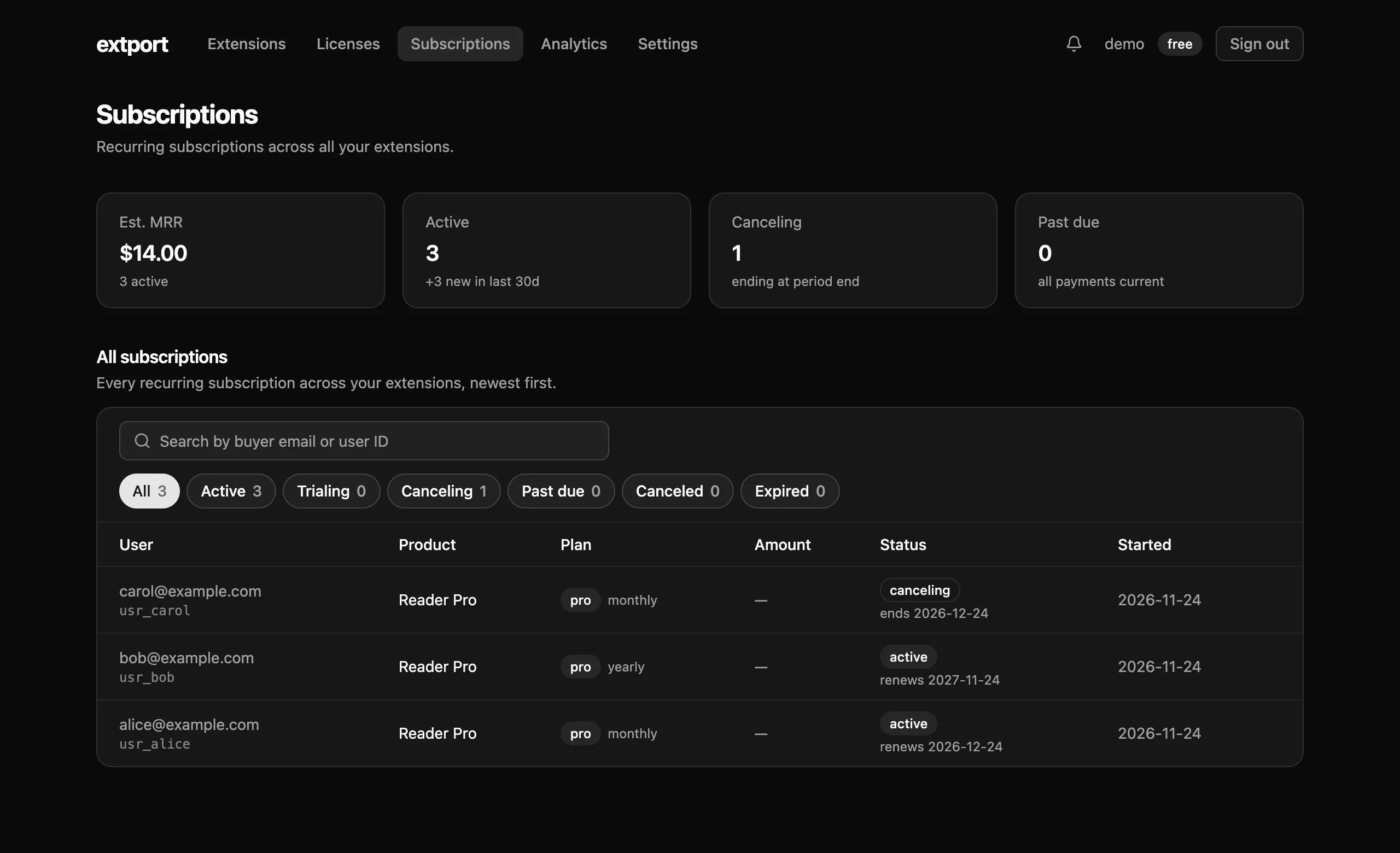
Section titled “4. Track MRR and subscribers”Open the global Subscriptions page for Est. MRR (yearly plans normalized to monthly), Active, Canceling, and Past due KPIs, status filters, and email/user ID search across all extensions — or inspect a single extension’s Licensing tab.
5. Native Buyer Portal
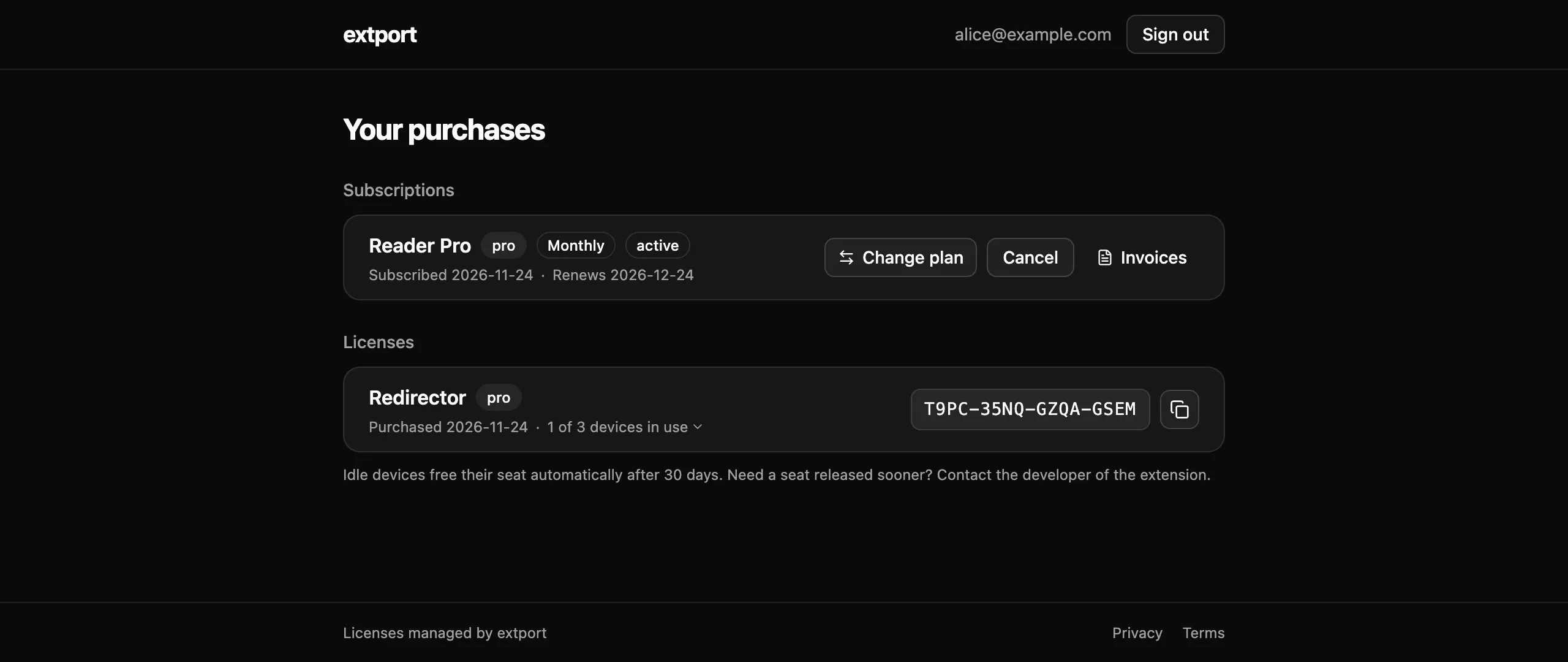
Section titled “5. Native Buyer Portal”Subscribers manage their billing at portal.extport.dev/portal via passwordless
email magic link or one-click SSO from POST /api/v1/subscriptions/portal — no Stripe Billing Portal configuration
required:
- Cancel & resume: schedule cancellation at the end of the current billing period, or resume before it expires.
- Change plan at period end: switch between active plans on the same extension and currency (for example, monthly ↔ yearly or tier upgrades/downgrades) via Stripe Subscription Schedules, with the ability to cancel a scheduled change.
- Native invoices: view up to 24 recent Stripe invoices with direct links to Stripe’s hosted invoice page and PDF receipts.
- Configure an optional help URL in Settings → Buyer support to surface your support link on every subscription card.
How the rest behaves
Section titled “How the rest behaves”- Automatic lifecycle sync. Renewals, trials (
trialing), payment failures (past_due), scheduled cancellations (cancelAtPeriodEnd), and expirations stay in sync automatically from Stripe Connect webhooks. - Duplicate billing is blocked. Calling
POST /api/v1/subscriptions/checkoutfor an already-entitled user never starts a second Stripe subscription — it routes them straight into the Buyer Portal via SSO. - Disabling a plan is safe. Soft-disabling a plan stops new checkouts and plan switches into it while existing subscribers continue renewing normally.